A single multi-hour AI training run can easily cost more than USD 1,000, depending on the GPU instance type and workload. An unmonitored Amazon Bedrock application generating unexpected token volume can add USD 10,000 or more to a monthly cloud bill before anyone in finance notices. GPU instances often sit at just 30–40% utilisation during inference because teams provision for peak demand and forget to auto-scale.
These are not edge cases. They are the normal failure mode for organisations running AI workloads on AWS without a dedicated AWS FinOps practice. This guide covers the specific controls, tools, and optimisation techniques that reduce GPU and LLM inference costs on AWS, across Amazon Bedrock, SageMaker, and self-managed EC2 deployments.
Our engineers will audit your workflow and estimate time-to-value at no cost.
Claim your free audit
Why AWS FinOpsfor AI Is Different
FinOps for AI is not an extension of traditional cloud cost management. It is a different discipline. Traditional FinOps optimises for compute utilisation, reserved instance coverage, and egress. AI workloads introduce cost drivers that standard dashboards do not surface: token-level API charges, GPU memory constraints that determine which models can run on which instances, bursty inference patterns that create idle capacity between peaks, and training experiments that burn compute without producing deployable models.
The three AI cost failure modes that appear repeatedly in production AWS environments:
- Invisible token spend: API calls to Bedrock or third-party LLMs not tagged or tracked in standard AWS Cost Explorer views, discovered weeks later
- Idle GPU waste: SageMaker real-time endpoints sized for peak traffic running at 30 to 40 percent utilisation the rest of the time
- Training sprawl: data scientists running multiple parallel experiments on GPU instances without cost visibility or approval gates
Addressing AI infrastructure cost management on AWS requires instrumentation at all three layers before any optimisation can be reliably measured.
Understanding Your AWS AI Cost Stack
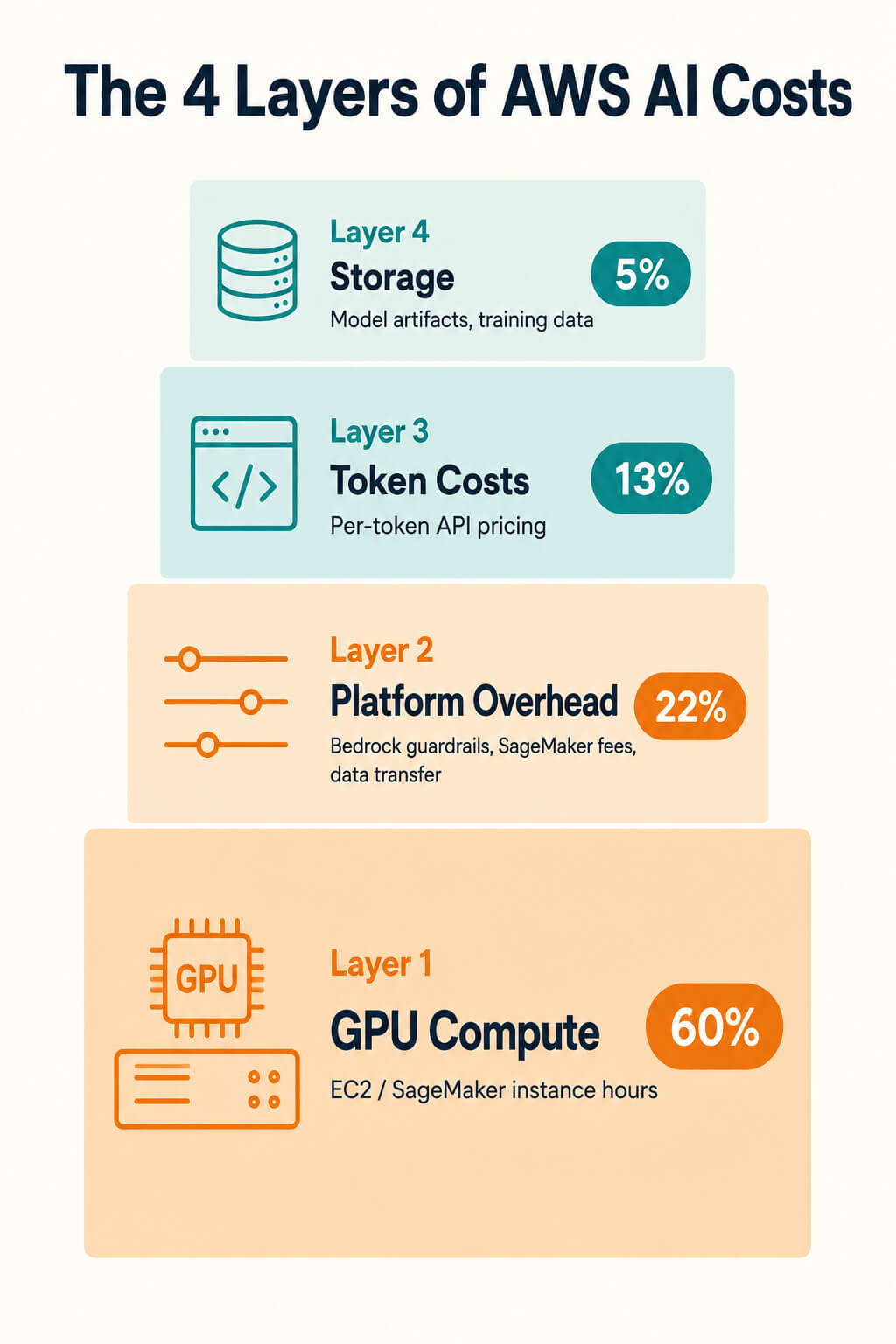
Before optimising AI costs on AWS, you need to understand the four layers where spend accumulates: GPU compute (instance hours), platform overhead (SageMaker endpoint fees, Bedrock guardrail charges, data transfer), token costs (per-token input and output pricing for managed models), and storage (model artifacts, training data, checkpoints). Most cost overruns are invisible because teams instrument only one or two of these layers.
Amazon Bedrock Cost Optimisation
Amazon Bedrock is the fastest path to running foundation models on AWS, but its per-token on-demand pricing model makes it the easiest place to accumulate uncontrolled spend. The following Amazon Bedrock cost optimisation techniques address the most common overrun patterns.
On-Demand vs Provisioned Throughput
On-demand pricing suits prototyping and variable workloads. For steady, predictable inference above roughly 50,000 tokens per minute, Provisioned Throughput (purchased model units) becomes cheaper. The crossover point varies by model, but most production applications generating more than 100,000 tokens per day will find Provisioned Throughput reduces cost significantly while providing guaranteed capacity.
Prompt Caching
Prompt caching stores frequently used context so repeated inputs do not need to be reprocessed, reducing both latency and input token costs. For applications that repeatedly send the same system prompts or knowledge base context, this can significantly improve cost efficiency. Amazon Bedrock supports prompt caching for supported foundation models, with minimum cacheable block sizes varying by model (typically 1,024–4,096 tokens). Refer to the model-specific documentation for current limits and supported models.
Model Routing
Not every inference call requires a frontier model. Routing classification, summarisation, and low-complexity generation tasks to smaller, cheaper models (such as Claude Haiku vs Claude Sonnet) reduces per-request cost by 4 to 10x with minimal quality degradation for these task types. Implement a routing layer that classifies incoming requests by complexity before sending to the model tier.
Batch Inference
Bedrock batch inference processes large volumes of requests asynchronously at up to 50 percent lower cost than on-demand. This is the right choice for any workload that does not require real-time response: content generation, document analysis, data enrichment, and offline evaluation pipelines.
GPU and SageMaker Cost Optimisation
GPU cost optimisation on AWS divides into two workload types with different strategies: training runs and inference serving. Conflating the two leads to over-provisioning for one and under-provisioning for the other.
Spot Instances for Training
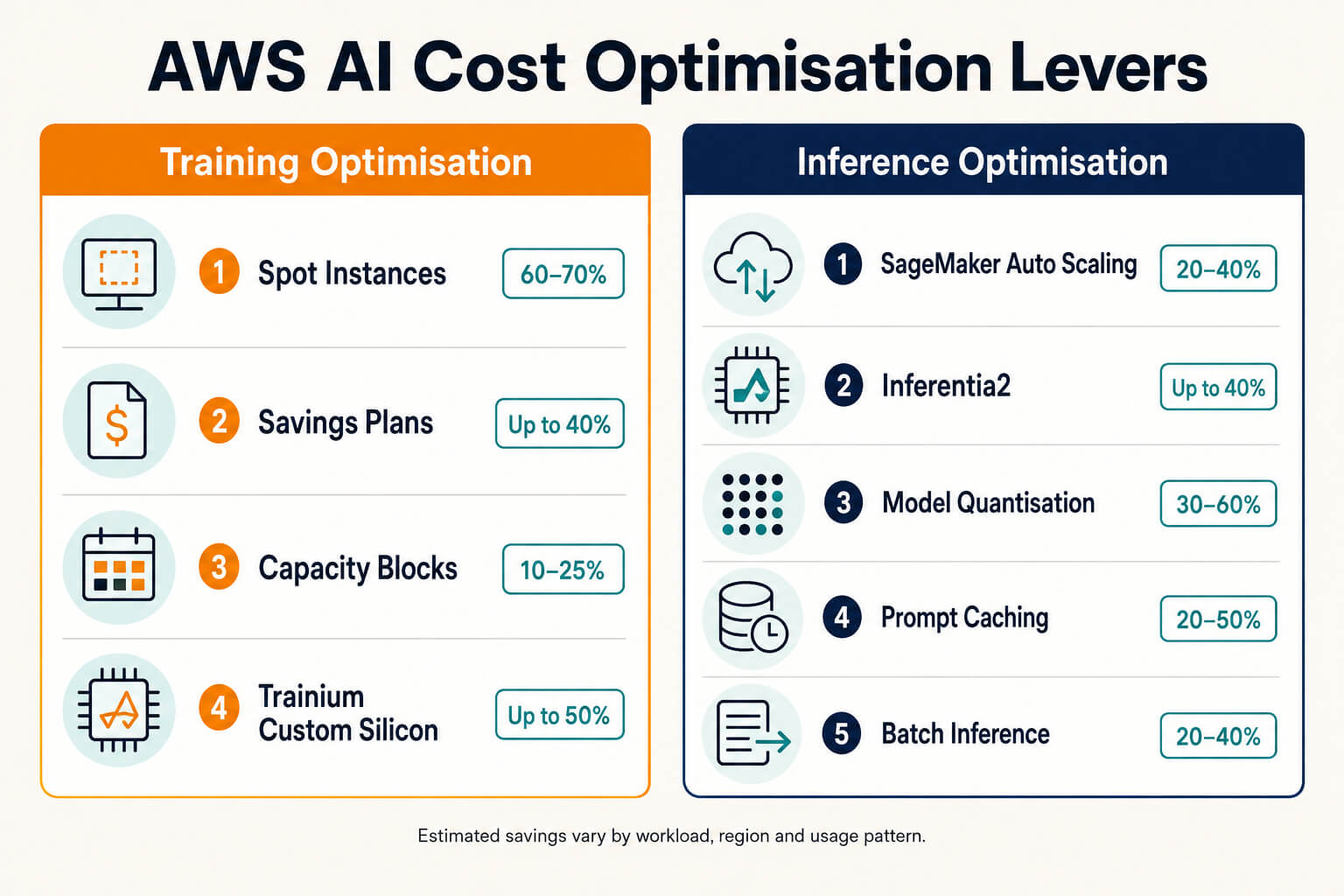
Training runs are the ideal Spot Instance workload: they are long-running, checkpoint-able, and fault-tolerant if implemented correctly. AWS Spot Instances on GPU families (p4d, g5) offer savings of 60 to 70 percent versus on-demand pricing. The key requirement is checkpoint-to-S3 every 5 to 15 minutes so interrupted runs resume rather than restart from zero. Spot availability varies by instance type and region, with p5 instances having more limited Spot availability than g5.
Savings Plans and Capacity Blocks
For predictable inference workloads, Compute Savings Plans apply a 1 or 3-year commitment discount across EC2 instance families including GPU instances. For time-sensitive training that requires guaranteed capacity, Capacity Blocks for ML allow reserving specific GPU instances for defined time windows, preventing the availability constraints that cause Spot-based training programmes to stall.
SageMaker Auto-Scaling for Inference
The most common source of Amazon SageMaker cost inefficiency is overprovisioned real-time inference endpoints that remain idle during periods of low demand. Configure Amazon SageMaker Auto Scaling using the InvocationsPerInstance metric to dynamically adjust endpoint capacity based on request volume. For workloads with intermittent or near-zero baseline traffic, Amazon SageMaker Serverless Inference eliminates idle infrastructure costs by provisioning compute on demand. Keep in mind that serverless endpoints can introduce cold-start latency, making them better suited for sporadic inference workloads than applications with strict real-time latency requirements.
AWS Custom Silicon: Inferentia2 and Trainium
For high-volume, latency-tolerant inference on standard models, AWS Inferentia2 instances (inf2) typically cost 40 to 60 percent less than equivalent GPU instances while delivering comparable throughput. Trainium offers similar savings for training. The trade-off is model compatibility: not all models run optimally on custom silicon without recompilation using the AWS Neuron SDK.
We'll map the exact workflows from this article to your business - free, in 30 minutes.
LLM Inference Cost Optimisation Techniques
For self-managed LLM inference costs on EC2 or SageMaker, the optimisation levers operate at the model and serving layer rather than the infrastructure layer.
Quantisation: Smaller Numbers, Lower Cost
Quantisation reduces model precision from FP32 or FP16 to lower-precision formats such as INT8, FP8, or INT4, reducing GPU memory usage and computational requirements. On supported models, FP8 quantisation on NVIDIA H100 GPUs using inference frameworks such as vLLM can deliver significantly higher throughput, typically between 1.3× and 2× for many inference workloads, while maintaining comparable output quality. It also often reduces GPU memory consumption, enabling larger batch sizes or deployment on smaller GPU instances. For workloads that are less sensitive to minor accuracy changes, such as classification, summarisation, and retrieval pipelines, INT4 quantisation, using techniques such as GPTQ or AWQ, can provide additional cost savings while maintaining acceptable output quality.
Continuous Batching
Static batching leaves GPU capacity idle between requests. Continuous batching engines such as vLLM, TensorRT-LLM, and SGLang process incoming requests dynamically, filling GPU compute continuously and delivering approximately 2x throughput improvement over naive serving. For high-volume inference, this is the single highest-impact technical optimisation available.
KV Cache
KV (key-value) caching stores attention key and value tensors from previous tokens, eliminating redundant computation for repeated prefixes. For applications with shared system prompts or few-shot examples, KV caching reduces both latency and compute cost for these common prefix tokens.
Model Right-Sizing and Distillation
Before optimising serving infrastructure, verify that the model itself is right-sized for the task. A 7B parameter model fine-tuned on domain-specific data frequently outperforms a 70B general model for narrow tasks at one-tenth the inference cost. Distillation transfers capability from a large teacher model to a smaller student model, preserving quality while dramatically reducing serving cost.
For a broader framework on applying AI to reduce cloud infrastructure costs across the stack, the structured approach in 7 AI strategies to optimize cloud costs covers the full optimisation hierarchy from architecture decisions through runtime tuning.
Building an AWS FinOps Practice for AI
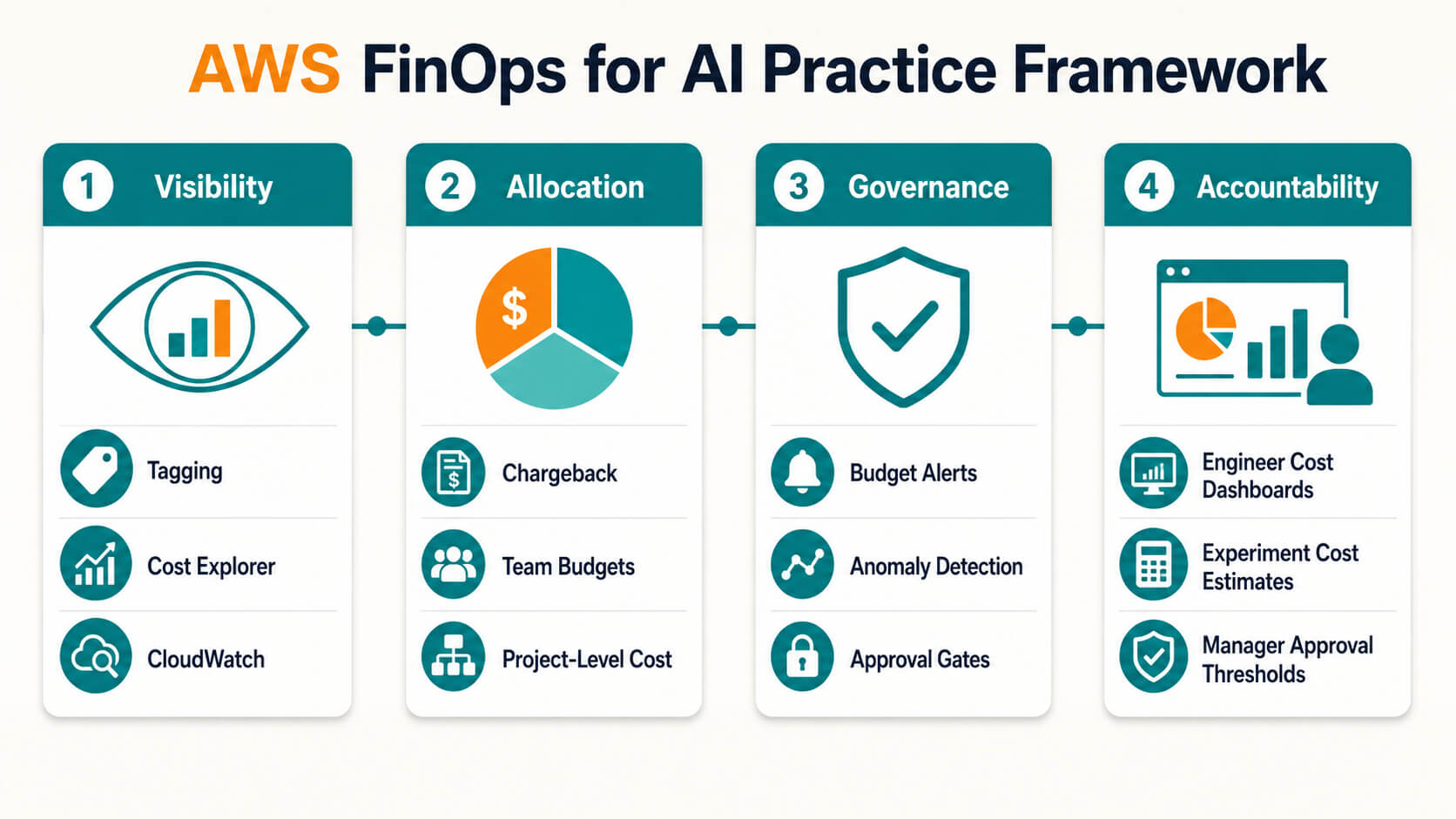
Technical optimisations only hold if the organisational infrastructure exists to sustain them. Building a functional AWS FinOps practice for AI requires four pillars: visibility, allocation, governance, and accountability.
Tagging and Cost Allocation
Every AI workload resource, including Amazon EC2 instances, Amazon SageMaker endpoints, Amazon S3 buckets, and Amazon Bedrock usage through tagged application inference profiles where applicable, should be tagged with team, project, environment, and model identifiers. Consistent cost allocation tags enable AWS Cost Explorer, AWS Cost and Usage Reports (CUR), and AWS Budgets to accurately attribute AI spending across teams and workloads. Standardise and monitor tag compliance using AWS Tag Policies, backed by Service Control Policies (SCPs) where tag enforcement is mandatory.
Budgets and Anomaly Detection
Set AWS Budgets for each AI project and environment with alert thresholds at 80% and 100% of the expected monthly spend. Create AWS Cost Anomaly Detection monitors scoped to Amazon Bedrock, Amazon SageMaker, or your AI cost allocation tags to identify unexpected GPU and token spend spikes. For Amazon Bedrock, configure an Amazon CloudWatch alarm on the EstimatedCharges metric to detect unusual cost increases early and take corrective action before they escalate.
Chargeback and Engineer Accountability
The most effective cost control in AI is showing engineers their own token and GPU spend in real time. Integrate AWS cost data into experiment tracking tools such as MLflow or Weights and Biases so that data scientists see estimated compute cost before launching a training run. Require manager approval for training jobs above a defined cost threshold.
For organisations building the broader cloud infrastructure and governance foundation that supports a mature Cloud FinOps programme, AWS Cloud Transformation Services covers the architecture, tooling, and operating model considerations in depth.
Conclusion
AWS FinOps for AI is not a one-time optimisation exercise. GPU pricing changes, model releases, and traffic patterns mean the cost structure of an AI deployment shifts continuously. The organisations that control AI costs on AWS are those with persistent visibility into token spend and GPU utilisation, automated anomaly detection, and engineering teams who see their own cost impact in real time. The technical levers in this guide cut costs. The organisational practice keeps them cut.
Frequently Asked Questions
1. What is AWS FinOps for AI?
AWS FinOps for AI is the practice of managing and optimising costs for AI workloads on AWS, including GPU compute, Amazon Bedrock token charges, and SageMaker inference. It differs from traditional cloud FinOps because cost drivers include token pricing, GPU memory constraints, and bursty inference patterns that standard dashboards do not surface.
2. How do I reduce Amazon Bedrock costs?
Enable prompt caching for repeated system prompts, cutting input token costs by 70 to 90 percent. Route low-complexity tasks to smaller models and use batch inference for non-real-time workloads at up to 50 percent lower cost. For sustained, high-utilisation inference workloads, Provisioned Throughput can become more cost-effective than on-demand pricing. The break-even point depends on the model and committed capacity. Use the Amazon Bedrock Pricing Calculator to estimate costs.
3. How much can Spot Instances save on GPU training?
AWS Spot Instances on g5 and p4d GPU families save 60 to 70 percent versus on-demand. Checkpoint to S3 every 5 to 15 minutes so interrupted runs resume rather than restart from scratch.
4. What is the fastest way to cut LLM inference costs?
Apply FP8 quantisation for roughly 2x throughput on H100 GPUs, implement continuous batching with vLLM or TensorRT-LLM, and right-size the model to the task. For sustained, high-utilisation inference workloads, Provisioned Throughput can further reduce costs. The break-even point depends on the model and committed capacity. Use the Amazon Bedrock Pricing Calculator to estimate costs.
5. What is Provisioned Throughput on Amazon Bedrock?
A commitment-based pricing tier that provides guaranteed inference capacity at a fixed hourly rate. More cost-effective than on-demand for workloads generating consistent, high token volumes above roughly 50,000 tokens per minute.
6. How do I monitor AI costs on AWS?
Tag all resources by team, project, and model. Enable AWS Budgets with 80 and 100 percent alert thresholds and AWS cost optimization via Cost Anomaly Detection on Bedrock and SageMaker spend.
7. Why do GPU instances show low utilisation but high cost?
Static GPU deployments in production average 30 to 40 percent utilisation. Configure SageMaker auto-scaling on the InvocationsPerInstance metric to scale down during off-peak hours and eliminate idle spend.
8. When should I use AWS Inferentia2 over GPU instances?
For high-volume, latency-tolerant inference on standard models, Inferentia2 costs 40 to 60 percent less than equivalent GPU instances. It requires model recompilation using the AWS Neuron SDK but delivers comparable throughput at significantly lower hourly rates, making it a strong fit for production AI cost optimization at scale.
You may also want to read

EUDAMED Requirements for Medical Device Manufacturers: A Compliance Guide